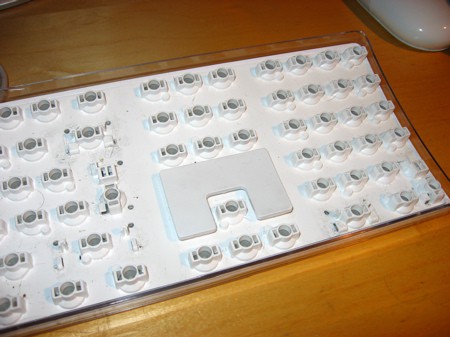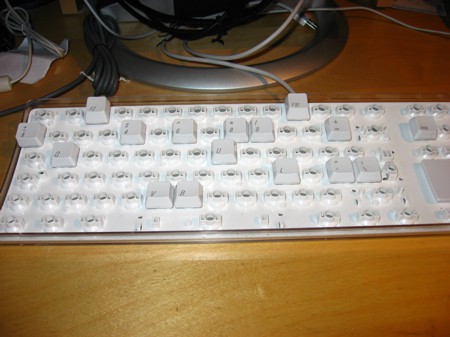
keys removed

There comes a time, when your shiny white Apple keyboard gets so dirty that you can’t bear one second more. For me, that day was today. I love the Apple keyboard, it is nice, ergonomic and looks very sleek. However the only ‘disadvantage’ (if you could call it that) is that it is white. It gets dirty easily and you can see really clearly everything. A simple wipe of the keyboard with a damp cloth was not enough. There was still remains of tons of different things, and I wanted it off. You never really notice how dirty your keyboard is, unless you use a white keyboard, or something of a similar colour. But with the Apple keyboard, the outer shell is clear, so you can see everything there too.
This little how-to guide will show you how I cleaned my keyboard to perfection. Click on for the detailed guide (with lots of photos).

UPDATE: I’ve been dugg, TUAW’d and del.icio.us‘d.
UPDATE 2: I had to change the photos to get them from flickr as I am burning through my bandwidth really quickly. I am at 18GB, and my max is 21GB per month!

attachment clips

The very first thing you need to do, is grab a camera, anything in which you can later use to read the keys is enough. Take a picture of the keyboard, a few would be helpful, so that you can remember what keys go where. You musn’t miss this step, otherwise you will be spending hours trying to find out what key goes where. It is not a pleasant experience. If you can zoom in on your camera, and see the keys then you are fine. But if you can’t then transfer the photos onto your computer and put them on the screen, or print them out.

Note: Reader Mark kindly pointed out that a view of the keyboard can be seen in the Keyboard viewer, that can be found in the International section of the System Preferences. Thanks Mark, this will save many users some hassle. I completely forgot about this!

A few of the keys (right shift, enter/return (both), backspace, space and the zero (number-side key)) contain these ‘attachment clips’, as can be seen above, that are used to make sure it is evenly pressed down. Please make a note of which one is attached to which key, this will save you a lot of hassle. I forgot, and I can’t put it back into the remainding place, because the key doesn’t operate properly.

If you have problems with removing the spacebar key, then an easy way is to either pass some string under it and pull it up (as a reader mentioned), or you can do it my way. What I did was remove every other key around it, and then pull at the top right and left. You should be able to slide it off. If that doesn’t work, then try pulling it gently from the top, and easing it out.
keys removed

The next step is start removing each key one by one. The easiest way, is to tuck your finger under one of the buttons between the small gap that separates the directional keys from the rest of the keyboard. You need to be careful and don’t rush. If you pull too hard it could break the clip that holds it onto the keyboard. That would be really annoying, as well as frustrating.
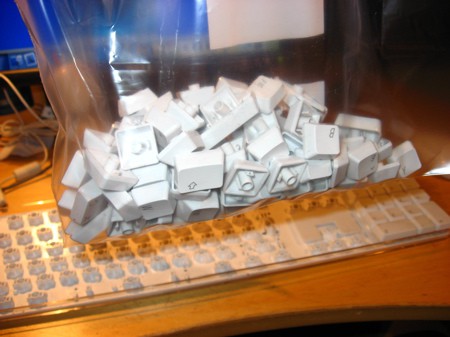
keys packed up

What you need to do next is gather up all the keys and put it in a re-sealable bag. For this I used a standard zip-lock bag that you can find at any grocery store (used for freezing food). It is perfect and allows plenty of room for all the keys, and the water to come.

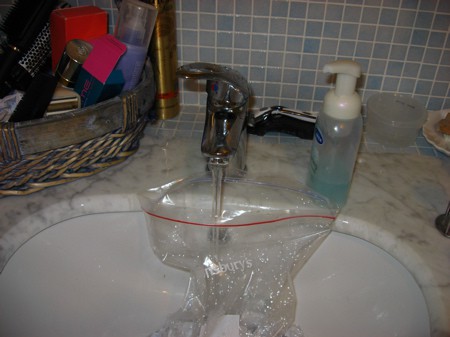
add water

Next comes the water. Make sure you use warm water. Fill it up about 3/4 full so that all the keys are engulfed with plenty of room to spare (for the keys I mean).
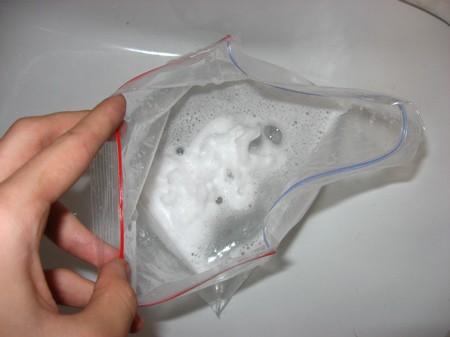
Note: Do NOT use hot or boiling hot water. As the keys are made with plastic they could deform. Though they are probably made of a very strong polycarbonate-type substance, you don’t want any keys to ‘warp’ so that it doesn’t fit back into its place.
Also, remember to plug the drain pipe with a plug so that no keys could fall down in the case that the bag happens to pop, or you accidentally spill it.
adding soap

Once you feel that you have enough water in the bag, add some soap. For this I used a ‘foaming’ soap that comes out as foam out of the bottle. You can use a ‘gel’ type soap as well, however that is probably harder to lather. Give a good few squeezes of the bottle so that there is plenty to go around.
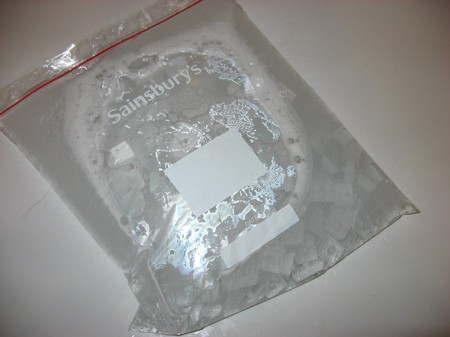
sealing bag

Next you need to seal the bag tightly, making sure that there are no gaps in the bag. After this, shake! Not too vigorously, as you don’t want the bag to pop and the buttons going anywhere. Shaking for about 3-4 minutes, with a short break in between (~ 1 min) will allow the soap to clean the buttons and fill all the nooks and crannies.
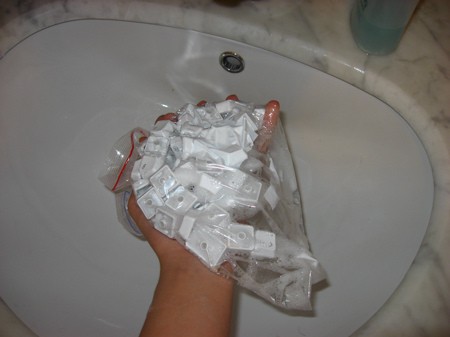
straining the water

Now you need to open the top fully and wrap your fingers around the top portion. Then rotate the bag upside down letting the water trickle out. If you want you can rinse it through with cold water to remove any excess soap, though this is rendered useless by the next step.
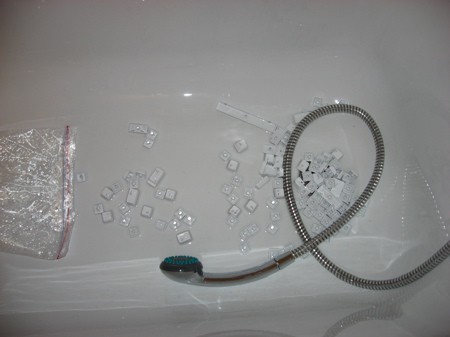
rinse

Empty the keys into an empty bath or wash basin. I then used the high-power setting of the shower head to remove the remainding soap and dirt from the keys. It will most likely not be fully clean, because of the grease/oil used to lubricate the attatchment clips. Rinse for a minute or two.

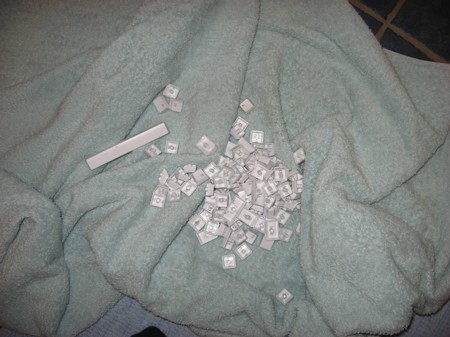
drying keys

Transfer the keys onto a clean towel. Grab the keys in a bunch and shake before you put them onto the towel. This will remove a lot of water, so the drying time is reduced. The way you do this next part is upto you. I mixed the keys in the middle, and with a firm but gently grasping action rubbed the keys against the towel. Do this for a minute or two, until the keys are mostly dry, but not totally. Leave this to dry for around 5-10 mins, during that time you can do the next few steps.

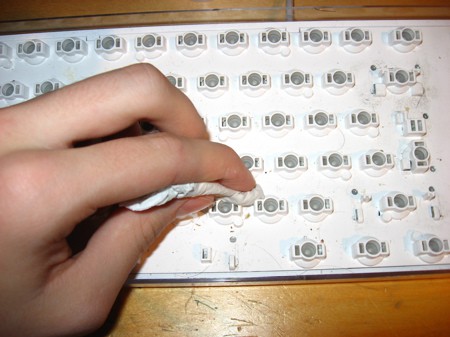
cleaning with a paper towel

You don’t just want the keys clean, but the surface of the keyboard! Grab a paper towel/kitchen towel and damp it in water. Make sure you use sparing amounts, as not to get any onto the electronics; it can seep through the hole where the keys affix to. If you have a keyboard duster, then you can move onto the next step once most of the dirt is removed. However if you don’t then you will need to spend a while to remove all the dirt and grime, it is quite painstaking!
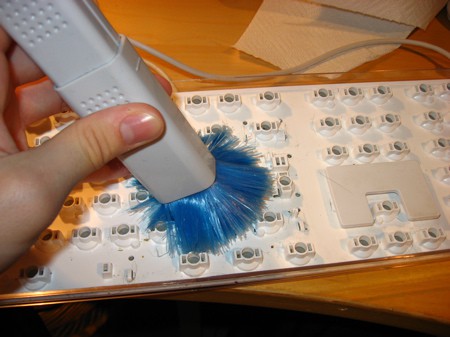
cleaning with a duster

With the duster go over the key spaces and push quite hard to shift away the dirt. This is really important, as the grease from the attachment clips can cover the surface, causing it to attract dust, which is harder to separate. A good idea is to do this over a sink, or outside so that you don’t make a mess. After all we are removing the dirt, you don’t want to put it onto the floor, do you?
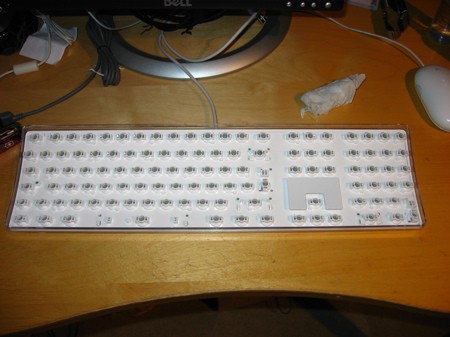
clean keyboard

Alass, your keyboard surface is now clean! Go back to your keys now, and place them onto a table close to the keyboard, making sure that each one is free of water. If it isn’t then go back and use a kitchen towel (or something similar) to remove the rest.

half the buttons replaced

We now start the long and arduous process of grabing a random key and placing it back onto the keyboard, using those photos that you took earlier on. Then you are finished.

macro shot of keys

The photo above is a macro shot of the new clean keys. Don’t they look beautiful. You can now go and type away on your clean and non-repulsive keyboard. I hope you enjoyed this tutorial, feel free to ask any questions.

FAQ

Q: Why don’t you put it through the dishwasher / washing machine?
A: Yeah, I’ve heard that one too. But I use my Mac a lot, and it will take much longer to wait for everything to dry. Even then there is a risk that the keyboard won’t work. Dishwashers and washing machines have chemicals in their detergent, as well as salt, which could damage the electronics. The heat could fry it too. Yes, you could remove the detergent and the heat, but then there isn’t any soap. This was much simpler for me. If you want to, you can try it, but I can’t be held responsible for any errors you make.

Q: There seems to be some sort of oil under the keys. What is it, can I remove it?
A: This is from the grease that lubricates the ‘attachment’ clips so that they can move freely. As long as you don’t remove it from these clips, it is fine to clean it from the keys and the keyboard. If you find that it doesn’t work, you can always remove the clip (not really ‘essential’ for the smaller keys), buy some more lubrication grease at a DIY or electronics shop, and then use it sparingly on the clips and replace.

Q: Does this work for the Bluetooth keyboard, or on laptops?
A:
From what I know, the cleaning process for the bluetooth version of Apple’s keyboard should be the same. However if you are going to try and clean underneath the white plastic, be careful as you could damage the electronics. Make sure to remove the battery first though!
For laptops, the keys a very different, as they contain two ‘scissor’ clips which can be very hard to refit. They also come loose very easily so if you do clean it, then be very careful. Underneath the keys, the electronics is tightly packed, so you should only wipe with a dry cloth or a duster. I wouldn’t venture into this area, as I would hate to pay to replace the keyboard, they are very expensive. If you do though, anything you do is at your own risk!

Q: Why don’t you try [insert idea here]?
A:
I probably never heard of it, or I was weary of trying it incase the keyboard failed. This worked absolutely perfect for me.

Q: What is the point in this? Can’t you just buy another keyboard?
A: I suppose I could but the nearest Apple store is around 50/60 miles away. I know I could go online, but why should I pay money for a new keyboard when this works perfectly. It’s not like I don’t have any time. It didn’t even take that long.

Q: It doesn’t take a rocket scientist to figure out how to do this, this is useless!
A:
If that’s what you think, I’m cool with that :) Now onto the point: For those who are inexperienced, or are scared of doing it incase something goes wrong, or just don’t know how to do it, it is very useful and can be of great benefit. That’s what most people have said, anyway.

Q: So how long did it take?
A:
Not as long as you might think. The whole process took around 50 mins. Around 25 was spent cleaning the keys, 15 for the whole keyboard and another ten for putting it all together and finding all the keys. I nearly lost one!

Q: What kind of a geek are you, can’t you remember the layout of the keys?
A:
I know where 98% of the keys go. I can touch type pretty well, however with the ‘symbol’ keys like the square brackets, tilde (~) and ‘§’, as well as the page up, down and those sorts of keys, I would probably get them confused. I took the picture so that it would save me time, and I did use it in the end. Also on the number pad keys, I wouldn’t know where the add, subtract, divide and multiply symbols would go. It saves time.


206 Responses to “HOW-TO: Cleaning the Apple Keyboard”  

  1. Gravatar Icon 1 Andrew

    Cool! Thanks, I was just about to go at it on my own this weekend! Wasn’t sure if they just poped out or if I had to get access from under the keyboad. yay! Time to make it white again. ;-)

  2. Gravatar Icon 2 lukas drechsel-burkhard

    if you spilled something on your keyboard you can also disassemble the electronics board. it takes some time and there are many screws. then you must be extremely cautious not to loose any of the soft rubber domes that rest in the upper plastic board.
    once disassembled you get a three layer clear plastic sheet with all the circuit lines printed on. i rinsed it with clear water and let it dry with kitchen paper between the sheets. this will take some time, dont rush it. the sheets are connected, so they will stay in the right orientation to each other. the circuits are very easily scratched too, but my bluetooth keyboard survived two cleaning cycles without a problem.

  3. Gravatar Icon 3 TT

    Hey– this is great, but I have one question.

    How did you remove the keys with the metal clips attaching them? I did all this a few months ago, but was unable to get the space bar off, which was unfortunate as it was the hardest hit victim of the great orange juice spill of ’06.

    So… how’d you do it?

  4. Gravatar Icon 4 Balazs

    Simple, I picked off the keys until I got next to the space bar (from both sides) and then the keys to the top right (the comma, period and forwardslash). I then carefully lifted at the top right and left, and pushed along the top of the spacebar until it popped off. I tried it just now to make sure. It is kindof hard to explain, so if it doesn’t work, then tell me and I’ll make a video.

  5. Gravatar Icon 5 AlanR

    An easy way to pull the keys off is to use a short piece of string. Just manipulate the string till it’s underneath the key and then you can pull up on it.

  6. Gravatar Icon 6 Eric W

    A response to what Lukas says above if something spills on your keyboard. First, it’s imortant to make sure the keyboard is completely unplugged from the computer so there is no electric charge whatsoever. Second, it is very important NOT to use just any water, let alone tap water. If you hope to resusitate a keyboard after a spill, you want to use de-ionized water. And I’d suggest trying to clean any spill first by dabbing it with a cloth with de-ionized water on it rather than immersing it – electronics do not like water so it’s best to use as little as possible.

  7. Gravatar Icon 7 Chris

    Wow! I was looking for this and i found this article from TUAW.com ! WOW! Thanks!

  8. Gravatar Icon 8 Lawsy

    I try not to eat at my computer but I just can’t help it. When I got a shiny new iMac I said to myself no drinks/food/outsiders near the mac at all.

    Most of my “rules” went out of the window and now I have toast in my keyboard…

  9. Gravatar Icon 9 Matthew E

    Taking a picture before you start is for wimps. Figuring out/deducing where the keys go by memory is half the fun! ;)

    I actually transposed two letters when I put them back on but didn’t notice for a while since I don’t look when I’m typing anyway. I was also wrong on about half the math keys around the num pad (=/*- ). Still, I’d do it again.

  10. Gravatar Icon 10 Balazs

    Now I’d rather have them in the right place :)
    I actually switched two keys around two! I mixed up the letter ‘i’ key and the forward slash button on the keypad. I didn’t notice until today when I realised it looked rather strange!

  11. Gravatar Icon 11 George Penston

    Wow, seems like a lot of work. Believe it or not, I just stuck mine in the dishwasher and let it dry for 3 days. Just be sure you have all the heat settings off and have a backup so you can give it the three days it needs to dry.

    I got the crazy idea from this old boing boing post: http://www.boingboing.net/2005/05/30/clean_your_keyboard_.html

    I decided to try it since I was selling my old eMac and had plenty of other keyboards around. It came out fully functional and looking like new. Give it the three days though to dry. I checked on it around 2 days and it still wasn’t completely working.

  12. Gravatar Icon 12 Balazs

    I would not try putting it in the dishwasher. I have no other keyboard and I couldn’t spend that much time away from my mac, while it was infront of me :)
    I am too afraid it wouldn’t work, and then what would I do, being a student, and the nearest Apple store ~60 miles away I daren’t try. This works fine for me!

  13. Gravatar Icon 13 Felix

    what about macbook’s keyboard? mine is so full of dusty & my short hairs. do i have to disamble the macbook? tutorial pls
    thx

  14. Gravatar Icon 14 Balazs

    I don’t have much experience with the MacBook keyboard. Nor do I have one or used one long enough to try and clean it. This is especially hard because the MacBook has a quite ‘different’ keyboard structure than normal laptops. Sorry I can’t be of more help!

  15. Gravatar Icon 15 Josh

    I just did this and it worked amazingly! Thanks for helping me save $29.
    I can’t wait to do the one at work next.

  16. Gravatar Icon 16 spacemky

    dude, just put the keys in a laundry bag and run it through a wash cycle! a lot less work. I’ve done this at least a dozen times to half a dozen keyboards.

  17. Gravatar Icon 17 Chris Tucker

    Wow. How complicated!

    Once a year or so, I pull all the keys off my Apple Extended Keyboard (Best. Mac Keyboard. EVER!) and dunk them, as well as the top and bottom of the keyboard enclosure in a bucket of very warm water, along with a generous dollop of Spic and Span. And then I let it sit over night. Brownian Motion is your friend.

    The PC board with the electronics and key switches (Switches. NOT rubber domes!) gets dry scrubbed with an old toothbrush.

    The next day, I pull all the plastic bits out of the bucket, shake them off and let them dry for a few hours on a towel.

    Once everything is dry, all the keys get stuck back into place, the keyboard is reassembled, and it’s good for another year or so.

    Yeah, it’s 20 years old. It’s not wireless. But after using the Apple Extended Keyboard, every other keybord feels like I’m poking at a slab of Silly Putty.

  18. Gravatar Icon 18 Charles

    I’m want to know how to remove the dirt that gets inside the clear plastic housing, way down deep under the keyboard mechanism. You can see it when you flip the keyboard upside down. How the hell does dirt even get IN to that space? You’d have to completely disassemble the housing to get at it, but maybe you wouldn’t need to take off all the individual keys.

    OTOH, taking off the keys and washing them in a bathtub, that’s ridiculous. A new Apple keyboard is only $29. Is your time so worthless that you can afford to waste a couple of hours disassembling and reassembling your keyboard? Just go buy a new one.

  19. Gravatar Icon 19 George

    Wow. What a great in depth “tutorial.” I usually just wipe mine down and hope that when I die, people will keep my keyboard so they can recreate me from all my lost DNA underneath the keys.

  20. Gravatar Icon 20 kokyun

    last week, i clean out my keyboard myself (http://forum.lowyat.net/index.php?showtopic=364732&st=0)
    but i didnt use any soap or water to clean it. just tissue . your way better. good job =)

  21. Gravatar Icon 21 Thierry

    Nice how-to but for a very dirty keyboard (Charles) there is a more technical tutorial (in french but photos) on this web site http://www.sterpin.net/ClavierBlanc.htm

  22. Gravatar Icon 22 peter

    that frenchman has a mighty dirty keyboard…

  23. Gravatar Icon 23 XIII

    Damn, that must have taken forever. I’d almost be tempted to just buy a new one…
    Nice howto!

  24. Gravatar Icon 24 For Charles

    @Charles

    Why in the world would you BUY a new keyboard if it’s DIRTY ?? If you’re so goddamned lazy that you have to buy a new keyboard instead of getting a cloth, popping the keys out and cleaning it, what happens when you get faulty RAM ?? Do you fucking buy a new PC ??

  25. Gravatar Icon 25 niclet

    Can you tell me if it is the exact same procedure for an Apple Bluetooth Keyboard ?
    Thanks.

  26. Gravatar Icon 26 iArno

    Woo!

    I’ve just did it using your method, my keyboard is like a brand new keyboard, I have difficulties because it seems so soft… I love the new way of keying in by simply touching the keys…

    Goodbye old ugly keyboard, welcome new key-style

    Thanks you very much

  27. Gravatar Icon 27 Savvas

    Hello there..Great tuto but i would like to ask you something..
    Under the keys i can see something liquid like oil or something..Isn’t this an essential thing in order to work like a new keyboard?Isn’t this disappear after the cleaning thing?

  28. Gravatar Icon 28 Hollis

    good loward that french keyboard is filthy. any chance he lives on a pig farm?

  29. Gravatar Icon 29 Balazs

    @Savvas: This is from the grease that lubricates the ‘attachment’ clips so that they can move freely. As long as you don’t remove it from these clips, it is fine to clean it from the keys and the keyboard. If you find that it doesn’t work, you can always remove the clip (not really ‘essential’ for the smaller keys) buy some more lubrication grease at a DIY or electronics shop and then use it sparingly on the clips.

  30. Gravatar Icon 30 Ryan

    I did something very similar to this a few months ago. I never thought of the bag though. I just let them soak in a bowl. I found it left the keys very clean but somehow they felt different, like it had strip something from the plastic. I will admit though, I used a rather strong cleaner.

  31. Gravatar Icon 31 Gregg

    Thank you so much. I just did this, following your instructions. I’m now typing on a clean keyboard that doesn’t stick and looks good.

    I, too, had thought about buying a new one, but you saved me the money that would cost. And your time estimate was right on target. It took me just under an hour to do it.

    How dirty was my keyboard?

    *blush*

    Here’s what I found:

    Cat hair
    Tomato sauce
    One piece sushi sticky rice
    Fingernail clippings
    Pop Tart crumbs
    Dust

    And other unidentifiable stuff.

  32. Gravatar Icon 32 Andrew

    Crap. I tried to improvise with my MBP, now it’s not powering up any more.

  33. Gravatar Icon 33 savvas

    Thanks a lot.

  34. Gravatar Icon 34 themacthinker

    Good tip. But this does not show how to clean the base station of the keyboard.

    —————–
    Wanna get the most out of your mac,
    Visit: http://www.mostofmymac.com

  35. Gravatar Icon 35 Phil

    Would this be the same for my pb keyboard?

  36. Gravatar Icon 36 Balazs

    @Phil: I don’t think so. Laptop keyboards are very much different. All of the keys have clips, and it is far harder to fit them back in. The main keyboard structure is also very delicate. It is possible to clean those too, but anything you try, is at your own risk.

  37. Gravatar Icon 37 Darleen

    LOL at all the responses.

    WOW some people are just plain nasty.

    Some are even messier than I am!

    And hasn’t anyone hear heard of an iSkin????

    Lovely little bit of clear silicon that can be peeled off, washed, dried and popped back on. After nearly two years, my keyboard has a couple of smudges on it and one or two cat hairs (they creep EVERYWHERE). But all the other detritus has come and gone on my iSkin.

  38. Gravatar Icon 38 Kenny

    Try washing your dirty hands before using your computer. Man you a re a slob!!. Maybe you shouldn’t masturbate at your desk :P .

  39. Gravatar Icon 39 Balazs

    @Kenny: Hehe :P . I don’t actually eat or do *anything* apart from type. I guess throughout the day it all collects up. Though, mind you, I do other stuff near the keyboard, which I guess could ‘fall’ onto/into it.

  40. Gravatar Icon 40 Lozanno

    Hi everyone.

    As an old mac user, you have to do this one time in your life. My problem in all cases is that the softness of the keyboard has been gone after the cleaning session. I have notice that if you remove/clean the lubricant of the keys, typing goes harder. I have used that light oil for typing machines and works very nice. Now is clean like new, and soft-typing too. Do not hesitate cleaning your mac, not only the keyboard.
    Because a clean MAC cost much more when you wish to resell it.

  41. Gravatar Icon 41 Mark Lander

    Actually you don’t need to take a photo of your keyboard. Just open ‘Keyboard Viewer’ found in the International System Preference Pane to see your keyboard layout. When you put the key back on it, the viewer will dim the key so you can confirm it’s in the right place.

  42. Gravatar Icon 42 erdojaro H

    Hi!

    I’ve been cleaning my keyboards for some years, never had any problem.
    Now I bought a MacBook, I’m not enough brave to disassemble the keyboard of this beauty.

    Have you ever tried to clean your notebooks keyboard? Did it work? Should I try?

  43. Gravatar Icon 43 Balazs

    For normal laptops, the keys a very different, as they contain two ‘scissor’ clips which can be very hard to refit. MacBooks are completely different to other laptops, so I wouldn’t try to clean it my way. The easiest thing to do would be to simply gently wipe it with a lint free cloth, or a keyboard duster. But don’t try to use a damp cloth. You wouldn’t want to fry the electronics. Even if it is one key, Apple charge you to replace the WHOLE keyboard! You’re stuffed then.

  44. Gravatar Icon 44 J Glover

    Thanks for the tip! I’ve now got a nice clean keyboard.

    BTW, I found this to be very helpful for the English Keyboard:

    http://www.spymac.com/upload/news/2005/09/27/m3261_Apple keyboard.jpg

  45. Gravatar Icon 45 Balazs

    @J Glover: Do you mean American English, or British English. My British English keyboard doesn’t look like that. The buttons on the enter side have a different layout. My enter button takes up two rows, and not one. Also my backspace key is shorter.

  46. Gravatar Icon 46 Salih Caliskan

    Thanks a lot. Very nice clean keyboard :D

  47. Gravatar Icon 47 lee

    keyboards and digusting… clean it monthly or better weekly…. ack!

  48. Gravatar Icon 48 imran

    Please send me apple proudcut upadates

  49. Gravatar Icon 49 Jack Pearce

    Hey,

    Thanks for the guide. Just to let you know those flickr images need to link back to their original flick page, otherwise they have the right to close your account. Just to let you know dude ;) .

    Jack.

  50. Gravatar Icon 50 Balazs

    Thanks jack! I’ll make sure to do that!

  51. Gravatar Icon 51 HumanIce

    I can’t do this with my one becaus its an COMPAQ one… can’t remove the buttons…

  52. Gravatar Icon 52 bill

    Why don’t you was your hands more frequently? ;-)

  53. Gravatar Icon 53 Jonatan

    Hi,

    Very thanks for this detailed guide! Yesterday I decided to follow it because my keyboard needed it :-) Before I read this guide, I felt afraid to damage the keyboard.

    I have the bluetooth model and in one hour, more or less, I completed the the whole process. I have to say it has been easier than I figure out.

    Thanks!
    Jonatan
    notesmentals.blogspot.com

  54. Gravatar Icon 54 Lidice

    Y como le hago para limpiar el de la MacBook Pro, recuerdo que con mi iBook solo levantaba unas patitas y el teclado se desmontaba pero con este no encontre dichas patitas, intente desarmar mi MacBook pero mejor busco ayuda. Ya ven uno que es descuidado y que se me cae el yogurt en el teclado limpie, pero me gustaria estar segura que no le pase algo, me ayudan?….

  55. Gravatar Icon 55 Balazs

    ¡Apesadumbrado no hablo español!

  56. Gravatar Icon 56 mike

    i can not get my delete key back on it is one of the ones with the bars can any one help me, i put it on but it just lays there and i can not press it

  57. Gravatar Icon 57 Leif

    I wonder if you (or those reading this) have found a solution for the increasing problem of stiction. I tried lubricating my keyboard with light silicone oil, but that didn’t last and I hesitate to apply more liquid lubricant (or grease). Graphite is not helping much either.

    Apple is not your friend; don’t get me started about cleaning the scroll ball on the Mighty Mouse which is glued shut!

  58. Gravatar Icon 58 Balazs

    I agree with you with the mighty mouse, after more than a year with it I got a new mouse. I have had enough of it. The scroll wheel stopped working!

    I can’t actually see what your problem is. Are the keys remaining stuck on the keyboard, if so, which keys? If they have the clips on it then maybe you can remove it and see if it works. If not then try cleaning underneath the keys with a Q-tip or something. I haven’t had this problem!

  59. Gravatar Icon 59 Eduardo

    Great, great, great ! ! ! ! !

  60. Gravatar Icon 60 NRK

    I just start by tapping the key board at different angles to dislodge the crumbs and shake it to get those crumbs out; then turn the keyboard up side down, spray it with windex, use a tooth brush, rinse it off with the shower spray, use a towel to dry the big drops and set the keyboard in the corner for a week. The keyboar is clean and I have only used about 15 minutes. My time is worth $100 and hour and I will not spend this amount of time for a keyboard when $10 will buy a functional and serviceable keyboard… NRK

  61. Gravatar Icon 61 Leif

    Stiction means “starting friction”. The keys resist being pushed down if they are pressed off axis (i.e. if they are pressed on the edge rather than right in the middle). This is one reason that the wider keys have their little wire anti-sway bars.

  62. Gravatar Icon 62 KiDo

    great tutorial, many thanks indeed, i’ve been wanting to clean my keyboard for some time now, but never got the guts to “rip” the keys of and see them break, now my keyboard is as clean as ever and it even types better!!! thanks!

  63. Gravatar Icon 63 AlanR

    Re: Stiction

    I use silicon spray. Not spraying directly but spraying the liquid onto a cotton swab then swabbing the stem of the keycap and the inside of the tube.

    Silicon spray has the advantage of being a “dry” lubricant (once the liquid evaporates) so there’s no greasy residue to attract more dust and mung.

  64. Gravatar Icon 64 Jameson

    I found you site awhile back via TUAW, and i finally used the post. Thanks! The only issue i had was putting the keys back (it took me forever to figure out the keyboard viewer) I found this image to help out anyone needing to know where the keys go.

    http://static.flickr.com/157/334592936_a6c1251c10.jpg

  65. Gravatar Icon 65 Kyle

    Thanks for this! Took me a little over 30 minutes, and my keyboard feels even better than it did when I first bought it! Remember to shake out the keys before putting them back into their keyboard slots, because the little shafts inside each key hold water quite nicely.

  66. Gravatar Icon 66 ben

    Hey, great section, just one question: how did you get the screws off the back, did you need to buy a special allen key?

  67. Gravatar Icon 67 Balazs

    I didn’t need to remove the screws. I didn’t touch that part at all. I just popped off the keys from their places.

  68. Gravatar Icon 68 Butch

    $29 for a new keyboard, that’s what I thought they would cost.

    $29 is what Apple lists them for on their website.

    $29 is not what CompUSA charges for this keyboard. They up the price to $34.99.

    When asked why this Apple product is priced $5 higher than Apple sells them for, all I got was a “dunno” and shrugged shoulders. They don’t know and don’t care.

    Maybe I am wrong, but Apple computers are the same price wherever I go, so why aren’t the keyboards?

    Sorry for getting off the cleaning subject but so many comments mentioned buying a new keyboard for $29 that I couldn’t resist passing on my CompUSA experience.

  69. Gravatar Icon 69 kid

    ok. so i spilled a big giant glass of water smack in the middle of my keyboard & decided to dry it out & figured out it was gross when i popped off the keys. so i’ve cleaned it, dried it & put it back together and my SPACE BAR won’t work!!! luckily, i had another keyboard in the closet or this would all be one very long word. but i don’t really like this bluetooth keyboard & i want to use my old fashioned one. any suggestions? nearest apple store is a million miles away. i’ve taken it off & put it back on about 5 times! thanks

  70. Gravatar Icon 70 Willie

    My son spilled a milk shake onto his keyboard. We removed the keys and washed them and wiped down the keyboard — all fairly carefully. When we went to plug it back in, it didn’t work. Nothing did. Is there something we are missing? We did have a universal USB keyboard in there for a half day, does something need to be reset to recognize the Apple keyboard. Help.

  71. Gravatar Icon 71 Balazs

    The keyboard should work without any ‘re-setting’. If it doesn’t work, then chances are that the actual circuitry could be short-circuiting. You could try disassembling the whole lower platform; however this will void your warranty for the keyboard. Use a Torx T6 screw to remove the three screws on the reverse of the Keyboard, all visible. The whole keyboard top should now come off (you can ‘shake it’ if it doesn’t come off immediately). Be careful as you donm’t want the wires to break.
    Then have a look at the PCB (the green ciruit board) and see if there is anything on it. Use a moist cloth to try and clean it. If it still doesn’t work, you can alternatively use some isopropyl (rubbing) to try and remove anything else that could have settled there. I really can’t think of anything, just make sure everything is connected. If it still doesn’t work, you could take it into an Apple Store to try and get it replaced or repaired (assuming you haven’t taken it apart, as this voids the warranty)

  72. Gravatar Icon 72 marionxlx

    hi 2 all.
    hello world! It is nice site. Keep working!
    best regards
    i found you here http://google.com ^^

  73. Gravatar Icon 73 Christopher

    Ref: Mighty Mouse cleaning Balazs 12 Dec 06

    Go to http://docs.info.apple.com/article.html?artnum=302417 as soon as it stops responding in any direction.

  74. Gravatar Icon 74 KeyBoard Guy

    This guide is mentioned at the Repair4Keyboard Apple keyboard repairing and cleaning guides section.

  75. Gravatar Icon 75 Dachaz

    Even though it “does not require a rocket scientist to do this” I personally found this tut encouraging since I was having doubts whither should I do it. Honestly, I was afraid that I’ll screw something up and have to spend ~60€ on new Wireless keyboard.
    Reading this I realised that there’s nothing to be screwed up, and now I’m typing on a keyboard as clean as new.

    Thanks, mate!

  76. Gravatar Icon 76 Leif

    The suggestions (for Mighty Mouse cleaning) in this Apple document provide nothing more than temporary relief, and a non-committal admission of guilt from a company which chose a more expensive manufacturing process (glued instead of snap fit) to ensure product failure and more sales, apparently. Eventually, the mechanism will become terminally begrimed.

    A brief account of my experience: the Mighty Mouse that broke the camel’s back.

  77. Gravatar Icon 77 Alwyn Schoeman

    Thanks, I was wondering about how I was going to do this.

    Personally I think the keyboard SUCKS!

    I touch-type and my hands are not huge for a male, actually good for typing.

    I use my right little finger to press return, on this keyboard you need to stretch to reach return if you still want to keep your hands in position. Carpal tunnel here I come.

    Also, what the heck is up with moving the Tilde character next to shift?????

    Most people who touch-type never use Caps Lock. You will regularly type a whole uppercase word by holding in the SHIFT. Although you don’t need to stretch on this one, you do miss the spot regularly…

  78. Gravatar Icon 78 wen

    it helps alot to use a flat headed screw driver to pop the keys

  79. Gravatar Icon 79 wen

    the screw driver also makes it easyer to remove the space key

  80. Gravatar Icon 80 alvaro

    you’re tub is really clean.

  81. Gravatar Icon 81 texasfred

    Most are typical and usual feedbacks to a reasonable and fair solution to a common problem. But Kenny and ‘for Charles’ and a few others need an attitude adjustment. Rude SWINE! If you don’t want the help, then what the fuck are you looking here for?

  82. Gravatar Icon 82 ludo

    I am interested in the topics discussed but have been feeling a little intimidated by the thought of the work

  83. Gravatar Icon 83 tom

    I am ready to take on the task…
    I am not sure if we have the same keyboard.
    My keyboard has a transparent housing. It WAS beautiful when it was new…
    I have dirt and yicky stuff showing in the BACK and EDGES of my keyboard…
    Are those areas accessible ?

  84. Gravatar Icon 84 Gareth

    Is it worth applying any more lubricant to the keys? My keyboard has been getting increasingly sticky, and it would be good to have it be smooth again.

  85. Gravatar Icon 85 lahra

    hey thats cool, thanks for the tip. I actually bought a new keyboard a few weeks ago but it is dirty again as a result of re-applying make up at my desk and in turn applying it to the keyboard(by accident). I am going to try this at the weekend. I hate having a dirty looking keyboard. Thanks.

  86. Gravatar Icon 86 Pixeler

    Good instruction, step by step. I did the same to clean my Black keyboard and messed up with keys for a while. I didn’t make a good note or Digital Photo (never though of it) and struggled to refix it. But after seeing apple key setup online I could do. If I would have seen your advise….

    Anyway your instruction is surely useful for anyone who wants to do the same.

  87. Gravatar Icon 87 Pomotnjik

    Thanks a lot, I just did it. Had to write something to meet the deadline and, of course, found that the keyboard desperately needs cleaning. Upper side: Now it shines, as bright as new! Downside: I still have to do the writing. Anyway, instructions are very good and I followed them to a tee.

  88. Gravatar Icon 88 Greg

    For the people complaining about the Mighty Mouse’s affinity for grime, try this:
    http://www.brendanfenn.com/cleanmouse.html
    This little procedure saved my scroll ball, and only took about five minutes.

  89. Gravatar Icon 89 Mykyl C.

    Thanks…I wasn’t sure if the keys just popped out. I really like this kb alot. The new ones are way too flat for my comfort zone. Thanks again!

  90. Gravatar Icon 90 Loonesta

    But how do you get the cat hair & other stuff out from in between the clear plastic and the white bottom of the keyboard?

  91. Gravatar Icon 91 groovyoldlady

    Awesome, awesome, AWESOME! I can’t thank you enough!

    My keyboard is so dirty that the dirt shows up in the pic I took of it!

    I’m off to scrub…

  92. Gravatar Icon 92 Tom Clarke

    Cheers, that was an excellent guide. It made for a thoroughly enjoyable autumnal Saturday evening!

  93. Gravatar Icon 93 aaron

    i use rubbing alcohol and qtips to clean the keyboard surface, but your technique for cleaning the keys is much smarter than mine. thanks!

  94. Gravatar Icon 94 ZZOOzzoo

    Thank you so much for this guide! Now my keyboard is clean and shiny again. :)

  95. Gravatar Icon 95 Gherri Geuce

    Why take a pic? Google image it to find one like this: http://www.empirisoft.com/images/directin_apple.jpg

  96. Gravatar Icon 96 John

    FWIW, you don’t need to worry about using de-ionized water to clean the PCB. Just make sure you don’t use SALT water :-)

    HP uses regular old tap water to clean PCBs after they are assembled. I use tap water (in Los Angeles, CA, US) whenever I need to clean a keyboard. No problems so far! (15 years.)

    Also, there are a couple of resellers that sell replacement Mac and MacBook keys. But fixing a MacBook is a completely different experience

    John

  97. Gravatar Icon 97 matei

    Did it, it works, nice advice. Thank you!

    Still one problem. Keyboard is clean now but it is not smooth anymore. Should i oil the thing? Is there a lubricant for this?

    Thanks!

  98. Gravatar Icon 98 Judy Astley

    Only from a student… This was priceless. Such thorough cleaning and the wondrous instructions could only come from someone highly skilled at displacement activity. All respect to you. And for those who think it’s just a matter of washing your hands, these white keyboards fill up over time with bits of skin, cat fur, dead ladybirds, dust, biscuit crumbs, eyelashes and sundry other bits of DNA. When I’ve bought a new keyboard, I might give the dishwasher a go on the old one, just to see… xx

  99. Gravatar Icon 99 Bruno

    Thanks for the tips…. and what exactly IS that gunk we find in our keyboards; and how did it get there? Yeeech.

  100. Gravatar Icon 100 david

    I did a much quicker fix for dirt under the keys:

    I tipped the keyboard on the bottom edge and banged it against the desk a few times so that any dirt was at the bottom of the keyboard.

    I then removed just the bottom row of keys.

    Next, I took a vacuum cleaner with a drapery attachment and vacuumed up the stuff in the keyboard and ran the vacuum over the whole keyboard a few times.

    I then replaced the bottom keys.

    Finally, I wiped off the tops off all the keys with a damp paper towel and then a dry one.

    Done. 5 minutes.

  101. Gravatar Icon 101 bram

    Thanks!! Worked just fine for me.

  102. Gravatar Icon 102 Clarke Douglas

    Amazing!
    This is a great blog site! I just completed the cleaning of my wireless keyboard, it was easy, and simple. I even took the time to oil the brackets!
    THANK YOU!

  103. Gravatar Icon 103 halcyonhalogen

    Mmm, yeah – great blog. I’m going to try it at my daughter’s place. she got a replacement keyboard but it’s not so good as the Apple one.

    I like the tip about using sticky tape to clean the Mighty Mouse scroll ball. Try that too.

    Ain’t life a wonderful thing!

  104. Gravatar Icon 104 Heather S

    Thanks for this step-by-step… My dirty keyboard has been annoying me for some time!

  105. Gravatar Icon 105 ok computer

    ho, asi era, que facil que boludo como no lo hice antes, gracias

  106. Gravatar Icon 106 Scott

    Just cleaned my Apple Bluetooth Wireless Keyboard. I found that a paint can opener, (loop and stem style) had just the right curvature to gently remove the keys without marring the plastic. Much easier on the fingers, while applying less torque to the keys. Removing the “attachment clip” keys was easier than described. A gentle pry up in the center, under the front edge removes even the spacebar without twisting and potentially damaging the clip or the key.

    In Mark Landers comment, the Keyboard Viewer is a shortcut to a reference photo of your keyboard. For laptops users with a wireless or extra USB keyboard, this doesn’t work, as the Viewer only shows the layout of the onboard laptop keyboard.

    Be careful to mark which clip goes with each key. I don’t remember which one now, there are two similar keys with different size clips. The smaller clip was on the larger key. Mixing them up could affect proper function.

  107. Gravatar Icon 107 CcK

    Thanks for your howto :)

    The keys feel very strong, the keyboard quality justifies the price i think :)

    Now I’m another proud user of a freshly cleaned apple keyboard ;)
    It definitely looks better :)

    Now let’s eat some pizza will coding to make all that really dirt again :D

  108. Gravatar Icon 108 Super Dave Osbourne

    I have been using, cleaning and reselling used components in the IT field since about 1982. The basic principle of a keyboard has not changed regarding the majority of what is out there, qwerty and push, contact devices. Keycaps are pretty much all the same (with some exceptions noted by notebook owners, of which I’m one). Pop off keys with flathead screwdriver, or in my case a trusty leatherman flathead/standard driver. Soak in bowl of lightly soapy (suds don’t matter) warm yet not scalding water for 3-5 mins. Take base of keyboard, hold upside down and brush off with dish brush even natural haired paintbrush. Spray lightly with windex or other ‘solvent’ while board is upside down. Wipe down. Brush lightly keycaps that have been soaking, rinse in strainer. Blow out capstem (you’ll get dizzy doing this, but make the kids giggle) and reassemble. Should take about 15 mins or 20 on 2-3 time around. First time I think I took 30 if I can remember back in the day when the Apple ][ was the deal. Its all been the same all this time, and no my time is not worth 100 per hour. If it is, you may be best to donate your keyboard to a local charity or round file it, and buy a new one. One piece of advice is, find a keyboard you LOVE, that feels good, and that is productive for you. I have 10 computers, and one keyboard, using VNC to interact with them all. The KVM or VNC makes it possible for you to uniformly get at your computers and enjoy it. 90% of your time with a computer input is via keyboard. Much like a bed is worth 1000s for a proper fitting, so is a keyboard worth 100s. Keeping it clean is just part of the ritual I have to make sure I’m effective in my daily computer. Even if 0.01% efficiency is lost due to crud, back key motion or flow, over time that adds up to be much more than the cost of a good multi hundred dollar keyboard.

  109. Gravatar Icon 109 Victor

    thanks man,
    i’m writing on my brand new white keyboard!

    i’m in southamerica, i bought this keyboard for 60 bucks.

    thanks

  110. Gravatar Icon 110 Jenna

    I think you are very sweet to have done this. It’s a little bit of angel geekiness. Thanks

  111. Gravatar Icon 111 solisflos

    This was a a great tutorial. My keyboard is like new. thank you so much!

  112. Gravatar Icon 112 Ian

    Thanks for that article!

  113. Gravatar Icon 113 Suzanne

    Cleaned the keyboard…looks great.
    Now those keys with those metal attachment clips do not work properly. They are attached to the keys, via those little brackets, but they seem to not sit away from the key,against the keyboard, allowing for even pressure. The keys do work when hit dead-center. Any ideas?

  114. Gravatar Icon 114 Suzanne

    Never mind… figured it out. On a note to those with the same problem:
    The solid horizontal part of the tension wire clips into the KEY and the two short horizontal pieces go UNDER the white brackets on the keyboard base, thus creating and maintaining the even tension along the key. So much for taking note to how it looked when I disassembled it…

  115. Gravatar Icon 115 Egypt Urnash

    Hey, thanks for this – the wash-in-a-bag method worked great. I used dish soap and skipped your shower-head step; I just emptied out the bag and put more water in to rinse.

  116. Gravatar Icon 116 Loocy

    Thankyou for this great little tute.
    My disgustingly filthy (though not as bad as the french guys) keyboard is wonderfully clean again.

    One tip for the wired keys: I kept these separate from my other keys and just wiped them with a damp paper towel so the oil is not removed. These were the first to go back on the keyboard while the other keys were drying.

  117. Gravatar Icon 117 DonnaC

    Hey Thanks for the tutorial! I tend to eat at my desk and some of the keys are starting to stick. I for one and NOT interested in adding more plastic things into the landfill than I need to – so if I can just clean my keyboard and keep it, I’m all for it. Thanks again.

  118. Gravatar Icon 118 roop

    Worked like a charm. Two suggestions:

    1) After you’ve pulled a couple of keys off by hand and seen how much force it takes, use a spoon to pry up the reminder to avoid pinching and scraping the heck out of your fingers.

    2) When drying, the keys will tend to retain water in the the column on the underside long after the rest of the key has dried. i sped the drying process up by running the whole batch of keys through a salad spinner a few times, which pulled a lot of water out of those little columns.

  119. Gravatar Icon 119 Kap

    Typing on my freshly cleaned keyboard:)

    Got a spare one from my work, which was ridiculously dirty,

    but pretty nice now:D

    cheers!

  120. Gravatar Icon 120 Katy

    OH MY GOOOOOOOOD!!!!!! IT BEAUTIFUL!!!!! iv just clened my keyboard with the advice from this site and its like its brand new! its so pretty and white! :D it had been pissing me off for ages and now it gleaming! :D i didnt know you could just pull the keys off like that! :O and also, the photo taking of it before you start is good cause its like before and after! you can see what a difference you have made, minted, i love it, THANKS!!!! :D

  121. Gravatar Icon 121 Jeroen

    If you’re putting up all these pics anyway, why not put up the ones of the keyboard layout so people don’t have to make their own?

  122. Gravatar Icon 122 Tsa

    Thanks!!! Amazing how it looks and feels… sharp again!

    I have been wanting to do it since a year ago, and finally decided to once I saw your instruction, and again thanks for it!!!

  123. Gravatar Icon 123 Nicola

    I tried taking off the ’0′ key on the side number pad just to test, then I put it back on and it felt funny, doesn’t work properly. Now I’m scared to do the rest of the keyboard. I realised that it’e one of the ‘bigger’ keys, is there a special way to put them back on?

  124. Gravatar Icon 124 John Minger

    Solved the “where do the keys go” dilemma… Looked on wife’s Mac at the next desk. Ha!

  125. Gravatar Icon 125 SJ

    Thank you so much for putting together! I can’t even believe how clean my keyboard looks now!!! And you right about those attachment keys, I should have paid closer attention, took me an 1/2 hr to figure out which ones went with which keys.
    :)

  126. Gravatar Icon 126 Wopke

    Excellent tip, worked perfectly for me and my keyboard! TAL!

  127. Gravatar Icon 127 Map

    Thanks a lot! My keyboard is just like new!

  128. Gravatar Icon 128 HR Koole

    Great info, worked like a charm. Thanks!

  129. Gravatar Icon 129 Ted

    Awesome! Thanks!

  130. Gravatar Icon 130 Katie Campbell

    Awesome directions! My keys aren’t sticky anymore!!!

  131. Gravatar Icon 131 Anil

    Cleaning your keyboard to prolong its useful life does not just achieve a saving of a few dollars. There is an environmental cost to all industrial products in addition to the monetary cost. Like all manufacturers Apple can reduce environmental cost if they make things like keyboards easily cleanable and publish their own guidance on how to do it. In the absence of that guidance, well done for figuring this out.

  132. Gravatar Icon 132 Frank

    Thank you for posting this. It worked great. My keyboard is now clean and the keys don’t stick.

  133. Gravatar Icon 133 Mariana Moreno

    Hey! Thank you very much for the tips! My keyboard cleaning went fantastic! THAN YOU!

    Big regards from Mexico!

  134. Gravatar Icon 134 henry

    another way to clean them, especially if you dont want to bother with the whole sink thing, is to take the keys off, then put them in a mesh lingerie wash bag that your girlfriend/wife/you (if you’re a chick) has and run it through the washing machine. works great if the keys are especially dirty… that laundry detergent is designed to get out organic grease from the human body…

  135. Gravatar Icon 135 Shahn

    Booyaka!
    Thanks for the great info, I was ready to buy a new keyboard. So you just saved me 50.00 bucks
    Thanks
    Shahn

  136. Gravatar Icon 136 Shane

    Great guide! My keyboard looks awesome now! I went a bit further and took the whole thing apart to clean it (previous owner spilled some nasty stuff on it), but wouldn’t have done it had I not found your page. Thanks!

  137. Gravatar Icon 137 Lau

    Cheers on the guide mate!

    I’d like to add I used a cleaning alcohol (95%) to get all the grub out of the main keyboard assembly itself, rather than just using soapy water. Worked like a charm and the keyboard is smooth as before :-)

  138. Gravatar Icon 138 JoRDANA

    can you help me? I don’t know whay should i do
    i dont noob!

  139. Gravatar Icon 139 Jon

    Finished, thanks for your advices, very helpful.

  140. Gravatar Icon 140 Candi

    THANK YOU!!! I hate having a keyboard with a clear case because you can actually SEE the dust you’re missing when you clean the top… I wasn’t sure if it was OK to just pop the keys off of this thing, so your tutorial answered that for me.
    I just did some spot cleaning–my space bar, both shift keys, my control and option keys, and I had spilled something sticky between my k and m. All is nice now.
    You might add a photo that shows how to re-attch the metal clips on the larger keys. It is easy, but going into it blind is a little scary.

  141. Gravatar Icon 141 David Chambers

    Very useful tutorial. Thanks for taking the time to write it. David.

  142. Gravatar Icon 142 sangerinde

    HELP…
    I.think.a.little.water.got.into.the.spacebar.”tube”.and.now.it.will.not.work….do.you.think.it’s.permanent,or.will.a.little.airdry.help?
    …and.yet.my.keyboard.is.gorgeous…:-)

  143. Gravatar Icon 143 Andreako

    Hey man, not only did you give me a nice afternoon, my keyboard is now clean and has a totally different sound. Maybe i did something wrong, but maybe it’s just the original sound, who knows. Shiny, though. Nice work!

  144. Gravatar Icon 144 Gabriel Mendoza

    Getting a mini keyboard is usually like getting a pager instead of a cell phone. You could kind of get the job done but in no way will the pager get the job done in the same time and as easily as the cell phone will.

  145. Gravatar Icon 145 Shotpurple

    Very helpful – thanks for such a clear guide! :-)

  146. Gravatar Icon 146 macchick

    GREAT tutorial — One disappointment:

    I thought that doing this would make the keyboard perform as smoothly as it did when it was new, but sadly, that is not the case. I still have to press down on the keys pretty hard to get the letters to appear onscreen and I think its giving me carpal tunnel syndrome.

    The keyboard looks clean and great now, but doesn’t work any better, sadly. (I think a few of the keys are actually HARDER to press down than they were before I popped ‘em off and cleaned the keyboard.) Thanks for the excellent, very clear, helpful tutorial though.

    Style over substance wins in the end, I guess.

  147. Gravatar Icon 147 Bill Bartmann

    Hey good stuff…keep up the good work! :)

  148. Gravatar Icon 148 catamia123

    Very helpful! Go To Google > Images and search Apple Keyboard and select the pic of the model you have…no need
    to take your own photo.

  149. Gravatar Icon 149 mahesh

    this keyboard is just bad design. FOR USE. this keyboard is great design. FOR SALE. it is engineered to present well, to sell easily. however, a simple gray keyboard that doesn’t show dirt, that isn’t unsightly, has better utility. either that, or apple should have made it easier to disassemble the keyboard. 1 hour to clean a keyboard?! that’s a ridiculous waste of time.

  150. Gravatar Icon 150 Mick

    Hey, thanks for the great tutorial. Because my whole keyboard was dirty, I left the keys on and put the whole thing in a kitchen trash bag, and washed it with hot soapy water as you suggested. It’s really clean now, but doesn’t work anymore — can you help?

  151. Gravatar Icon 151 johanne

    i don’t succeed to put again the ‘attachment clips’, of the keys (right shift, enter/return (both), backspace, space and the zero (number-side key).

    how can ido???

  152. Gravatar Icon 152 Laurie McCabe

    Thank you, thank you, thank you!

    My keyboard was SO gross! The fact that you can see the lint and cookie crumbs through the clear base was a daily source of frustration.

    I’m going to do this today! (but I already popped a key off to try it and was successful in getting it back on, so I’m ready to clean).

  153. Gravatar Icon 153 Maarten

    Thanks for very relevant article. I disassembled the keys from the keyboard (an Bluetooth wireless, used-to-be-white Apple keyboard) but I tried the dishwasher… bit lazy… all the keys went inside, the keyboard as well – upside down in the top drawer. I used a bit of detergent (next time I might not, just to be sure), set it to a short, low temperature cycle (30 degrees C) and let it dry for five days afterwards. Works like a charm and is squeaky clean!

    Regards

    Maarten

  154. Gravatar Icon 154 Elsie Winstead

    I took off a few keys at a time, wiped the keys and the area underneath them with a barely dampened microfiber cloth, then put them back on. This drastically reduces the time to sort out the keys and get them back to the right place. It also doesn’t wash the lubricant off the clips. (One guy had commented that it typed harder after he washed the keys/keyboard–maybe he washed off all the lubricant?)

    It worked fine for me because my keyboard was not extremely dirty so the whole wash them in a bag thing wasn’t necessary. Looks and types great! Thanks for the tutorial.

  155. Gravatar Icon 155 Queelscrese

    Наша цель – быть полезными людям. Помоги детям инвалидам жить, ведь у них нет того чем наделила природа тебя… делаются периодические отчеты с фонда благотворительности.

  156. Gravatar Icon 156 Veinaiciereep

    sorry, I just have to spam you. I am really really sorry. I hope you don’t mind. I wont spam much. I promise

  157. Gravatar Icon 157 choiffitiglic

    test test test is the best best best nestle nestle whaaaa?
    dsdsdsddsdsds

  158. Gravatar Icon 158 choiffitiglic

    test test test is the best best best nestle nestle whaaaa?
    dsdsdsddsdsds
    ewtewtewtewtewtew

  159. Gravatar Icon 159 Forex News Online

    What I adore about blogs is which they spark an concept in my brain. When that occurs, I really feel as I require to comment using the hope it may be interesting to some people. Simply because you will find lots of blogs and forums with many points of view, they question your comprehension. It is at these moments when you’ve valuable insignt other people might not have experienced, together with the blogger him/herself. I find myself coming back again to to your writings only because you have several very great insights and also you have been at this a really long time, that is very inspiring and tells me you know your stuff. Maintain triggering imagination in other people!

  160. Gravatar Icon 160 doustydoR

    comment6, [url=http://posterous.com/people/4xlxc5TNYSUF]legal cialis[/url], 6494, [url=http://posterous.com/people/4xlqHDs8cOD7]online generic viagra[/url], 6223, [url=http://posterous.com/people/4xluCRDFXGut]phentermine pharmacies[/url], note, [url=http://posterous.com/people/4xlqHEcXs50Z]phentermine us[/url], 6586, [url=http://posterous.com/people/4xluCRMXCchj]how long diazepam in system[/url], balanced, [url=http://posterous.com/people/4xlqHDrXZfWN]viagra pricing[/url], 6375, [url=http://posterous.com/people/4xlxc5TP7hqV]levitra in canada[/url], hoarse, [url=http://posterous.com/people/4xlqHDYLvzMZ]prozac on line[/url], 1200, [url=http://posterous.com/people/4xluCRN7PKXD]adipex fastin[/url], liquor, [url=http://posterous.com/people/4xlqHEqUDrtD]order vicodin[/url], quill

  161. Gravatar Icon 161 wileyyjaneelll

    [b][url=http://www.buytramadol.co/buy-tramadol/]CLICK HERE to Buy Tramadol Online[/url][/b]

    [url=http://www.buytramadol.co/buy-tramadol/][img]http://www.buytramadol.co/buy-tramadol.gif[/img][/url]

    buy tramadol buy cheap tramadol online
    buy tramadol online pay by mastercard
    buy cheap tramadol online 35
    buy hydrocodone tramadol free online consultation
    buy mexico online pharmacy tramadol

    does methadone effect tramadol
    tramadol hcl 50mg tablet
    street value of tramadol
    tramadol for canines side effects
    tramadol and abuse liability
    what is tramadol hcl 50 mg
    side effects tramadol dogs
    actos aciphex cardizem cd tramadol
    what are the uses for tramadol
    drug prescription tramadol

    [url=http://www.quotegator.com/buy-tramadol-online/]Order Cheap Tramadol[/url]
    Getting smoking cessation help can be one of the most significant things you can do in your life. Obtaining smoking cessation aid can allow you to kick your smoking routine once and for all. If you can quit smoking using one of the accessible stop smoking products on the market, you will find that you have additional vitality and more money, and that you have an overall better sense of well-being than you ever did when you were a smoker. You and all of those around you will be healthier, and you will likely live longer, as well.
    Mega-T Green Tea Diet includes a high amount of green tea extract that helps suppress your appetite and at the same time, increase your metabolic rates. Green tea in Mega-T Green Tea Diet contains substances that affect how the hormone noradrenaline acts.

    [url=http://forum.budgetterenmetkinderen.com/profile.php?mode=viewprofile&u=17627]Buy Tramadol Canadian Pharmacy[/url]
    [url=http://www.cyberwebbizz.com/v2/forum/profile.php?mode=viewprofile&u=32341]Buy Tramadol Online[/url]
    Never give up in try to find ways to overcome your depression, anxiety or fears. At times, you may feel overwhelmed and feel that there is nothing else you can do. The fact of the matter is that there are ways in getting rid of your depression and anxieties. Here is a brief list of techniques that you can use to help gain a foothold on your anxieties and fears.
    There is no need for expensive gym memberships or extravagant exercise equipment. Fun, fast-paced exercise videos featuring well-know fitness experts and celebrities will give you the inspiration and direction you need to create your very own, highly effective home workout routine. How much would you have to pay to have Denise Austin as your personal trainer? With home exercise videos, shell be available to you 24 hours a day for pennies a day.

    [url=http://janoshaza.hu/forum/profile.php?mode=viewprofile&u=20560]Buy Online Tramadol[/url]
    [url=http://forum.realitybreakpodcast.com/viewtopic.php?f=3&t=302575]Order Tramadol Online[/url]
    [url=http://foro.laterapiadelapublicidad.com/viewtopic.php?f=2&t=251083]Buy Tramadol Online Without Prescription[/url]
    Another laser eye surgery risk is to develop serious dry eye syndrome. After surgery, your eyes might not be able to produce enough tears for keeping moist. This not only produces discomfort, by can also reduce quality vision due to permanent blurring and other problems. This eye condition may be permanent. It is usually treated with intensive eye drop therapy, but other procedures can also be used.
    Beautiful flower gardens have been a part of our world for thousands of years. Yet, flowers dont provide us with food, clothing fibers, or any other item considered necessary for survival. So, why do we spend so much time planting and caring for flowers?

    [url=http://changepaths.org/forums/index.php?topic=11181]Buy Tramadol Online Without Prescription[/url]
    [url=http://jackinaround.com/forum/index.php?topic=111850]Buy Tramadol Canadian Pharmacy[/url]
    Also known as a cardiac monitor, a heart monitor is a piece of electronic equipment that can be used to track or observe heart functions continuously. It allows people to place a numerical value on their healthiness based on their heart rate and have a target heart rate to work for. The more complex versions of the heart monitor allow physicians to see any signs of deterioration or improvement and make the necessary adjustments immediately.
    For Dr. Merle Diamond of the Diamond Headache Clinic in Chicago, the new survey underscores why family and friends need to encourage sufferers to seek treatment. Migraine touches all aspects of sufferers lives, including the people who care about them the most, which is why loved ones are often in the best position to help find new solutions, says Dr. Diamond. The first step toward effective migraine management is to talk with a doctor about available treatment options that can relieve the pain and symptoms.

    [url=http://www.inw-game.com/forum/index.php?topic=138663]Buy Cheap Tramadol Online[/url]
    [url=http://www.lauraleekharris.com/webforum/viewtopic.php?f=2&t=311633]Buy Tramadol Online[/url]
    [url=http://SURMENE.NET/forum/profile.php?mode=viewprofile&u=43833]Buy Online Tramadol[/url]
    Other preventive measures you can try include keeping warm if your headache is associated with the cold. Try using a different pillow or changing your sleeping position. Adopt correct posture when reading, working or doing other activities that may cause headache. Exercise your neck and shoulder muscles when doing prolonged typing, computer work and when doing any close-up work. Getting enough sleep and massaging sore muscles can help reduce a headache occurring. Hot or cold showers or baths may relieve headaches too, so its worth experimenting to see if either help you.
    Healing of the hidden self will better all aspects of our lives, both the professional aspects as well as the personal aspects. Self-control is one of the crucial lessons of self-development and healing the hidden self, since it will lead us to becoming had better people overall. If we are able to show self-control in many situations, we will be able to overcome them and avoid the associated stress. It is crucial that we adapt and grow in life and become individuals that are more self-controlled.

    cod tramadol carisoprodol
    tramadol astonished information
    darvocet and tramadol
    doctor online prescription tramadol
    tramadol markings an 627
    making tramadol injectable drug forum
    can tramadol be crushed
    tramadol duloxetine
    cod tramadol saturday
    tramadol 0nline

  162. Gravatar Icon 162 Unfinalomigma

    comment4, [url=http://tsbninc.net/cs/members/lasix-120-mg.aspx]generic lasix[/url], jingling, [url=http://tsbninc.net/cs/members/how-long-does-clonazepam-stay-in-your-urine.aspx]clonazepam trade name[/url], :-Ú, [url=http://tsbninc.net/cs/members/medicine-cialis.aspx]cialis in bangkok[/url], value, [url=http://tsbninc.net/cs/members/phentermine-online-overnight.aspx]phentermine orders[/url], O:-), [url=http://tsbninc.net/cs/members/oxycodone-strengths.aspx]oxycodone 80mg[/url], :~(, [url=http://tsbninc.net/cs/members/propecia-mexico.aspx]propecia hairline[/url], <3, [url=http://tsbninc.net/cs/members/valium-dosages.aspx]valium uses[/url], 9939, [url=http://tsbninc.net/cs/members/drug-prednisone.aspx]prednisone 5 mg[/url], 6617, [url=http://tsbninc.net/cs/members/price-of-cialis.aspx]20 mg cialis[/url], 5901, [url=http://tsbninc.net/cs/members/lorazepam-weight-loss.aspx]lorazepam how long does it last[/url], 3015

  163. Gravatar Icon 163 mosaic tile discount

    lol if you say so, heh

  164. Gravatar Icon 164 Reettybroow

    ini adalah distro kaos couple muran indonesia, silahkan pilih designnya dan pesan sekarang juga yah…

    [url=http://remajasukses.com]distro kaos couple murah[/url]

  165. Gravatar Icon 165 Seetteroula

    [url=http://yuvuvu.info/new][COLOR=Red][b][i][u][SIZE=15]Sexse Move [/SIZE][/u][/i][/b][/COLOR][/url]

    [url=http://yuvuvu.info/new][img]http://yuvuvu.info/img/16440.jpg[/img][/url] [url=http://yuvuvu.info/new][img]http://yuvuvu.info/img/5683.jpg[/img][/url] [url=http://yuvuvu.info/new][img]http://yuvuvu.info/img/12306.jpg[/img][/url] [url=http://yuvuvu.info/new][img]http://yuvuvu.info/img/1142.jpg[/img][/url]
    [url=http://yuvuvu.info/new][img]http://yuvuvu.info/img/17307.jpg[/img][/url] [url=http://yuvuvu.info/new][img]http://yuvuvu.info/img/9981.jpg[/img][/url] [url=http://yuvuvu.info/new][img]http://yuvuvu.info/img/17170.jpg[/img][/url] [url=http://yuvuvu.info/new][img]http://yuvuvu.info/img/206.jpg[/img][/url]

    [url=http://yuvuvu.info/new][img]http://yuvuvu.info/img/15714.jpg[/img][/url] [url=http://yuvuvu.info/new][img]http://yuvuvu.info/img/4222.jpg[/img][/url] [url=http://yuvuvu.info/new][img]http://yuvuvu.info/img/13299.jpg[/img][/url] [url=http://yuvuvu.info/new][img]http://yuvuvu.info/img/14884.jpg[/img][/url]
    [url=http://yuvuvu.info/new][img]http://yuvuvu.info/img/6426.jpg[/img][/url] [url=http://yuvuvu.info/new][img]http://yuvuvu.info/img/237.jpg[/img][/url] [url=http://yuvuvu.info/new][img]http://yuvuvu.info/img/4849.jpg[/img][/url] [url=http://yuvuvu.info/new][img]http://yuvuvu.info/img/6026.jpg[/img][/url]

    Ara Wwwgooglecomtr Wwwgogle
    Www Akaziyahoo Org
    Sexclub Co Uk Mayfairx
    Sextv1
    Xxxphatbooty Com
    Www Daz24 De
    93 3 Laraza El Bacilon Del Mandril
    Tube8 Free Com Porn Hut Movies
    Rade Floci De La Pizda
    Usenetlord Kati
    Enrique Teutelo Naked
    Hmong Porn Cheater
    Fakepix Movie
    Ina At Anak Kantutan
    Zizaru Video
    Nymphetts Top
    Beasteal Ity Stories
    Wifeloverssearch
    Www Bangfarm Com
    Video Porno Ukraini
    Filme Porno Zoofili
    Sex Sa Klinkama
    Real Hemaphrodite Porn Tube
    Pornogiller Com
    Gamze
    Bedava Filim Izle
    Fly Spil No
    Bdsex Porn
    Wwwfreeblackporn
    Wwwtiava Com
    David Rebolledo Nude
    Tube Porno Gravide
    Truveo Anal Google Video
    Freexvidios Com
    Xvariar Ebony Cum Dump
    Kaylakream
    Youtube Monica Roccaforte
    Www Myadultclips Txt Com
    Http; Shoofsex Com
    Www Pashto Porn Girls Videos Com
    Grannyhotsex C0m
    Dvdrig Xnxx
    Justine Gromada Porn Videos
    Wwwphim 88 Com
    Chef Osama Alsayed
    Six Videos Com Arbia Hot
    Soledadestasola Com Ar
    Enature
    Rikos Microwear
    џ сџ эџ Іџ Ќџ уџ џ хџ сџ э
    Www Ujizz Picture Xxx
    Mobilni Porn
    Video De Ben 10 Porno
    Lsscoll Ez Ru
    Kapowhost Faces Page

    [url=http://hottubxxx.cz.cc/Claro_Do.html]Claro Do[/url]
    [url=http://hottubxxx.cz.cc/Diasimes_Gymnes.html]Diasimes Gymnes[/url]
    [url=http://anysex.cz.cc/Cerpin_Lucah.html]Cerpin Lucah[/url]
    [url=http://nonnude.cz.cc/Petchara_Backalley.html]Petchara Backalley[/url]
    [url=http://yuotovez.cz.cc/babes-in.html]Babes In[/url]
    [url=http://yuotovez.cz.cc/porno-turcoaice.html]Porno Turcoaice[/url]
    [url=http://nonnude.cz.cc/Female_Mastrubation_Com.html]Female Mastrubation Com[/url]
    [url=http://xtgem18x.cz.cc/xxx-andreea-marin.html]Xxx Andreea Marin[/url]
    [url=http://hottubxxx.cz.cc/Wet_Family_Porn.html]Wet Family Porn[/url]
    [url=http://nonnude.cz.cc/Soulja_Boy_Yutube.html]Soulja Boy Yutube[/url]
    [url=http://anysex.cz.cc/Penhous.html]Penhous[/url]
    [url=http://yuotovez.cz.cc/sikismek-istiyorum.html]Sikismek Istiyorum[/url]
    [url=http://hottubxxx.cz.cc/Pashto_Xnxx.html]Pashto Xnxx[/url]
    [url=http://xftvdarla.cz.cc/porno-pinoy.html]Porno Pinoy[/url]
    [url=http://nudtubez.cz.cc/Young_Tube_Com.html]Young Tube Com[/url]
    [url=http://nonnude.cz.cc/Mothervsboy_Com.html]Mothervsboy Com[/url]
    [url=http://tubes247.cz.cc/Poze_Porno.html]Poze Porno[/url]
    [url=http://xtgem18x.cz.cc/corco-tube.html]Corco Tube[/url]
    [url=http://xftvdarla.cz.cc/porn-honduras-video-x.html]Porn Honduras Video X[/url]
    [url=http://nonnude.cz.cc/Freecommunity_Livesex.html]Freecommunity Livesex[/url]

    [url=http://aspoba.rr.nu/erica-karupsp.html]Erica Karupsp[/url]
    [url=http://iupuretop.cz.cc/monsterporn-cartoon.html]Monsterporn Cartoon[/url]
    [url=http://lompphigpua.rr.nu/puke-ni-nanay-tube.html]Puke Ni Nanay Tube[/url]
    [url=http://inseks.mx.am/freeporn-pinoyporn.html]Freeporn Pinoyporn[/url]
    [url=http://sautubexx.cz.cc/brazzerpornovideo-cam.html]Brazzerpornovideo Cam[/url]
    [url=http://vnperson.cz.cc/youphorn-live-sex.html]Youphorn Live Sex[/url]
    [url=http://pornhuv.cz.cc/teennagersex-com.html]Teennagersex Com[/url]
    [url=http://shufunix.cz.cc/frikinternet-famosos-wmv.html]Frikinternet Famosos Wmv[/url]
    [url=http://bravotex.cz.cc/sisate-pusacice-kurca.html]Sisate Pusacice Kurca[/url]
    [url=http://vengalax.cz.cc/aminal-cock-sex.html]Aminal Cock Sex[/url]
    [url=http://veretons.rr.nu/vivahotbebe-scandal.html]Vivahotbebe Scandal[/url]
    [url=http://bnpeyboy.cz.cc/sexofilia-con-animales.html]Sexofilia Con Animales[/url]
    [url=http://foundphilossi.rr.nu/aku-main-teteknya.html]Aku Main Teteknya[/url]
    [url=http://veretons.rr.nu/mumosengen-movie.html]Mumosengen Movie[/url]
    [url=http://fgvidoxxx.co.cc/9taxi-movies.html]9taxi Movies[/url]

    [url=http://xxpornotb.info/Negras_Gostosas.html]Negras Gostosas[/url]
    [url=http://tubo69zz.info/Motherdaughterse.html]Motherdaughterse[/url]
    [url=http://xxpornotb.info/Teenstarsmagazine.html]Teenstarsmagazine[/url]
    [url=http://ssexyhoy.info/Khmer_Pussy_Blog.html]Khmer Pussy Blog[/url]
    [url=http://xxpornotb.info/Animalpass.html]Animalpass[/url]
    [url=http://dvdrigz.info/Silverdaddies_Clips.html]Silverdaddies Clips[/url]
    [url=http://slfycig7.dangdroz.info]Redtube Dogsex[/url]
    [url=http://sedtubez.info/Porno_Filmovi_Sa_Transvestitima.html]Porno Filmovi Sa Transvestitima[/url]
    [url=http://t6g8.k9fuckk.info]Goggleseach Free Sexy Videos[/url]
    [url=http://uyhlyy.sex1080xx.info]Pornsc Com[/url]

    [url=http://chinyoshinga.rr.nu/index.html]chinyoshinga[/url]
    [url=http://otglisex.cz.cc/map.html]otglisex[/url]
    [url=http://enrakecard.rr.nu/index.html]enrakecard[/url]
    [url=http://chondphebin.rr.nu/index.html]chondphebin[/url]
    [url=http://kitzremonew.cz.cc/map.html]kitzremonew[/url]

    [url=http://henpan.rr.nu/map.html]Namrata Shrestha Pornography
    [/url]
    [url=http://libmensparti.rr.nu/map.html]Basia Mularczyk Ckm
    [/url]
    [url=http://dzukushidagaza.rr.nu/map.html]Fotografije Lepe Noge
    [/url]
    [url=http://jikingikata.rr.nu/map.html]Yutbe Clipuri Xxx Porno
    [/url]
    [url=http://tayukake.rr.nu/map.html]Brazzen Sex
    [/url]

  166. Gravatar Icon 166 stomach pilates

    Hi buddy, your blog’s design is simple and clean and i like it. Your blog posts are superb. Please keep them coming. Greets!!!

  1. 1 Blog!NOBON
  2. 2 notitieblogje.nl
  3. 3 links for 2006-11-18 - Bomb.org.uk
  4. 4 saubere sturm party in sydney « opiumoox blog
  5. 5 Tastatur putzen - Apfeltalk
  6. 6 iDiy.mobi » the mini Blog » HOW-TO: Cleaning the Apple Keyboard
  7. 7 bloguras » Archivo del blog » 5 cosas que hacer cuando te quedas sin Internet
  8. 8 wann.es » Blog Archive » links for 2007-03-02
  9. 9 Technology» Blog Archive » The Popularity of Apple
  10. 10 A tutorial to clean your apple keyboard « Still Alive !
  11. 11 ARGH! A blue Sharpie leaked and dripped on my white Apple keyboard! - MacNN Forums
  12. 12 Review: Apple’s New Wired Keyboard · cavemonkey50.com
  13. 13 Dave’s Blog » Wie reinige ich meine Appletastatur? - Wie potzt ich mini Appletastatur?
  14. 14 basbennebroek.nl – Yprdrmnptf dvppm,slrm
  15. 15 how to clean mac keyboard at Mac Beginners
  16. 16 ¡Limpia tu teclado! ¡Guarro!
  17. 17 links for 2007-09-29 at pretentious blowhard
  18. 18 10 Clutter Kung-Fu Tricks
  19. 19 cafedave.net » Blog Archive » how to clean a mac keyboard
  20. 20 Bonita in Pink
  21. 21 Step by step guide for cleaning your Apple keyboard « Apple Top News
  22. 22 Lessons learned on a lazy Wednesday afternoon at A Hundred Words A Day
  23. 23 EH Blog | Como dejar tu teclado apple como nuevo (o casi)
  24. 24 The Abarentos Narrative » links for 2008-02-05
  25. 25 links for 2008-03-07 « squarechick
  26. 26 Κίνδυνος για την υγεία τα βρώμικα πληκτρολόγια
  27. 27 Life in the Geek Lane » Cleaning keyboard
  28. 28 Equinox of Insanity — Easy Way to Clean an Apple Keyboard
  29. 29 Cleaning Apple “Classic” Keyboard - Detronizator.org
  30. 30 Time to clean the keyboard « Fragments
  31. 31 Oggi pulisco la tastiera ! | gingerino
  32. 32 Anita’s actual news blog » Blog Archive » Step by step guide for cleaning your Apple keyboard
  33. 33 New Apple keyboard | hilpers
  34. 34 Workvitamins » Cleaning your apple keyboard
  35. 35 enerverend » Blog Archief » Microcultuur onder mijn vingertoppen.
  36. 36 Happiness is a clean keyboard - limeduck
  37. 37 bookmarks 090709 | [ mac i n t e r a c t ]
  38. 38 links for 2006-11-26 » jarango.com
  39. 39 Dobschat » links for 2006-12-02
  40. 40 ubernub.com » Mac Keyboard Wash


Leave a Reply


payday loans same day payday loans refinance home equity loans guaranteed online personal loans home mortgage refinance credit debt help instant cash advances fast cash payday loans overnight cash advance personal loan lenders home equity loans free debt consultation quick payday loans mortgage refinance unsecured loans apply for a credit card overnight cash loans personal money loans refinance mortgages debt consolidation loans fast cash no credit check mortgage loans need money fast fast personal loans debt management federal student loan consolidation 1000 payday loans home mortgage refinance loans personal finance loans emergency payday loans no faxing payday loans home mortgage refinancing credit cards unsecured personal loans refinance home loans no credit check payday loans personal loans debt management services consolidate your debt loans till payday no credit check personal loans instant personal loans bad credit unsecured loans mortgage refinancing bad credit loans student loans quick personal loans fast cash advances bad credit report repair cash advances credit card offers same day payday loans debt collection debt consolidation faxless cash advance home mortgage loans quick cash loans no fax payday loans student loan debt consolidation instant payday loans home loan lenders bad credit personal loans bad credit mortgage refinance unsecured payday loans credit card application personal loans for people with bad credit credit card debt consolidation bad credit credit cards low interest personal loans unsecured debt consolidation loans government student loans high risk personal loans mortgage banking no fax cash advance faxless payday loans payday cash loans fast cash advance payday loans no fax cash advances cash advance payday loans no credit check student loans low interest payday loans guaranteed personal loans payday loan with no fax 24 hour payday loans same day cash advances